
Basic GA4 and GTM tracking for cross-borders eCommerce sites
When launching an ecommerce activity internationally different URL structures than your initial site may be created.
Let’s say the website name is: thedigitalbreeze.com, here are 3 scenarios of structure:
- Subdomains:
- fr.thedigitalbreeze.com,
- pt.thedigitalbreeze.com
- Subdirectories/subfolders (scenario 2):
- thedigitalbreeze.com/fr,
- thedigitalbreeze.com/pt
- Top level domain with different extensions or suffixes (scenario 3):
- thedigitalbreeze.fr,
- thedigitalebreeze.pt

1- Subdomains
What to check in GA4 and GTM when using subdomains for international ecommerce websites? Example: fr.thedigitalbreeze.com
- In Google Tag Manager, ensure the same GTM tag container is installed on domain and sub-domains. Use GTM’s Preview mode on both the main domain and subdomains to verify the same Container ID is loading and tags fire correctly. If it is not, add the GTM code in the <head> and <body> of your subdomains too. In Admin > Install Google Tag Manager > see the instructions on where to place the tag.
- In GA4, use the same GA4 property and data stream across all subdomains. GA4 sets cookies for all subdomains by default so there shouldn’t be any required actions
- In GA4 reporting, the « Hostname » dimension needs to be added in a custom report to distinguish traffic on different subdomains.
2- Subfolders
Does a site using subfolder per country require a specific set-up on GA4 and GTM? Example: thedigitalbreeze.com/pt
- While no additional set-up is needed in GA4, having separate views per subfolder is very useful. Looking at performance per landing page show thousand of URLs in one view and make it time consuming to label them manually in Excel. Having one GA4 property and data stream are still recommended for visualising the user journey across the ecommerce site from multiple countries.
- Reporting sections can be tailored in GA4 in order to visualise performance per country. First way to report on this: in GA4 > Library > Create new report > Create detail report > Pages and screens. Add metrics to show and a filter for a specific subfolder representing a given country > Save the report. Repeat this report creation for each subfolder representing a country. Create a new collection and add all these reports
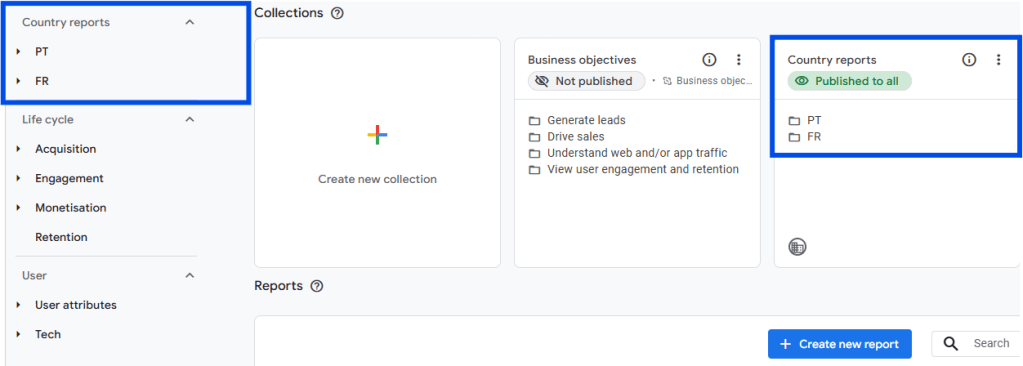
A second way to report on performance comparison of multiple country subfolders is to create content group for this view:
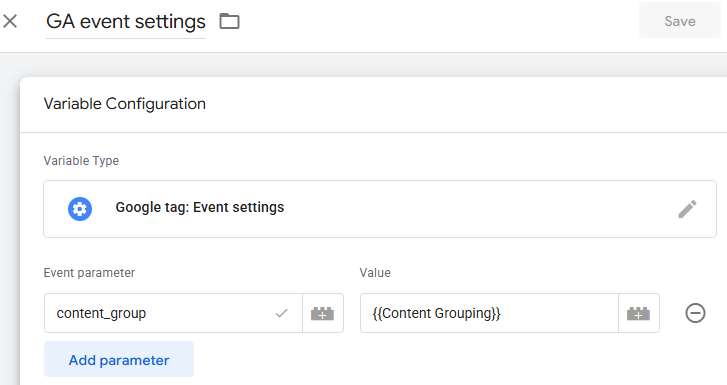
- Create two variables: in GTM > Variables > New > Regex Table. Name it « Content Grouping« . Set the Input Variable to {{Page Path}}. Add Row: In Pattern, enter your subfolder (example: /fr/). In Output, enter the new name (e.g., « FR ») and repeat this step for each subfolder. Check « Set Default Value » and give it a name like « Domestic site » (this variable will appear in your GA4 reporting when nothing matches the previous Regex table). Under Advanced Settings, uncheck « Full Matches Only » and « Enable Capture Groups » and Save the variable. The second variable to create Variables > New > Google Tag: event settings. Name it « GA event settings« . Add « content_group » in the Event parameter field and select the variable previously created « Content Grouping » and Save.
2. Update the Google Tag Configuration and the GA4 Tag configuration. In Tags > select the Google Tag configuration, in the shared event settings select « GA event settings » and Save. In Tags > select the GA4 Config, in event parameters > Event Settings Variable select « GA event settings » and Save.
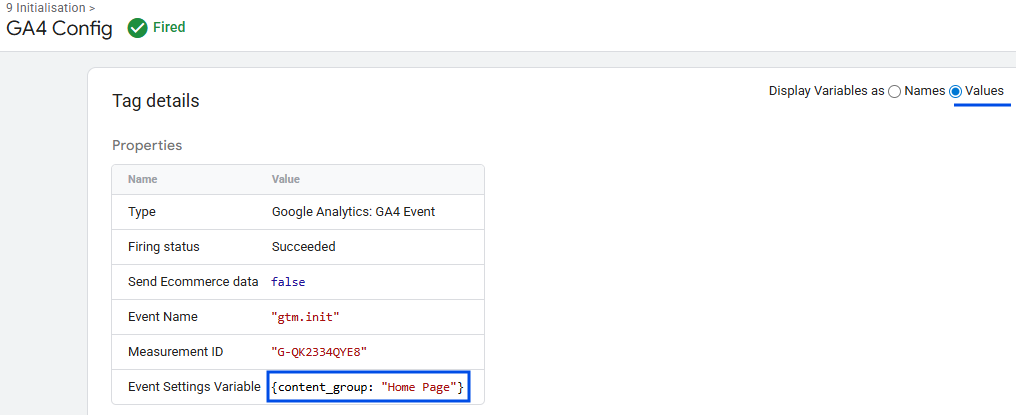
3. Activate the Preview, and when navigating to the pages of the site for which a content group label was added, click on the GA4 or Google Tag that fired. Make sure to tick « Display Variables as value » and see if the naming shows up.
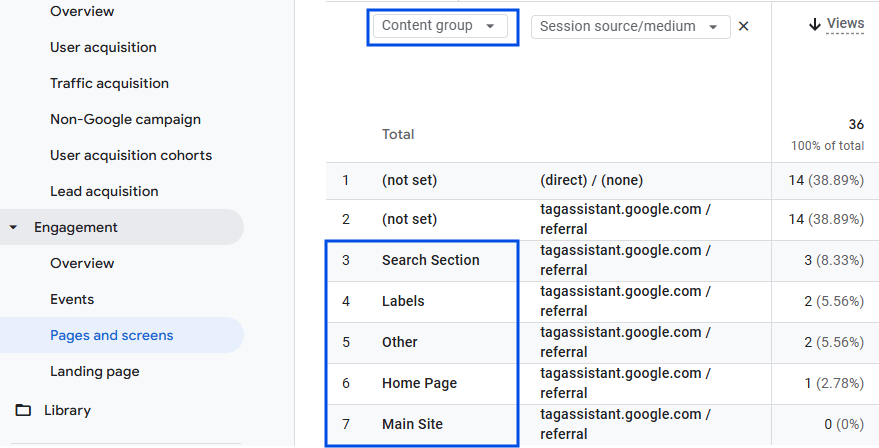
4. Now in GA4, under Reports > Engagement > Page and screens, select the dimension « Content group » and the renamed page groups will appear. Another dimension like « source / medium » can be added to split performance per traffic acquisition. The example below shows page renamed per topic but the idea is to see the different subfolders to differentiate countries: FR, UK, US etc
3- Cross domains
What tracking requires a top level domain having different suffixes per country? Example: thedigitalbreeze.co.uk, thedigitalbreeze.fr
Unlike the automated tracking on subdomains, one top level domain with different suffixes or country-codes will be considered as different websites. The scenario here is that performance will be tracked in the same GA4 property and with a single GTM container.
- In Google Tag Manager, ensure the same GTM tag container is installed on all domains. Use GTM’s Preview mode on both the main domain and subdomains to verify the same Container ID is loading and tags fire correctly. If it is not, add the GTM code on all your subdomains too. In Admin > Install Google Tag Manager > see the instructions on where to place the tag.
- Create a Conversion Linker Tag > New > Conversion Linker type > « Enable linking on all page URLs » and « Enable linking across domains » and add the domains. Do not forget the checkout domain if it is a different domain. Add a trigger > « All Pages ».
- In GA4, go in Admin > Data streams > click on your website > scroll down to Configure tag settings > Configure your domains > Contain thedigitalbreeze.com, contain thedigitalbreeze.co.uk etc. This prevents user sessions from breaking when they navigate between sites. Still in Configure tag settings > Show more > List unwanted referrals > Add domains which should not show as referrals.
- To test that GA4 register the same session and user, go on the first domain, click right anywhere > Inspect > Application and check the « _ga » ID for the session and « _gid » for the user. Then from the site again, click to a link sending to another country domain like a country selector button and once you land on the other domain, check that the « _gid » and « ga » codes are the same than the previous ones.
- The dimension « Host name » can be used in GA4 reporting to visualise performance per market.
Contact Us


Social
Designed with WordPress
 THE DIGITAL BREEZE